Repeated failed logins are one of the simplest signals that a WordPress account is being tested. A single wrong password is normal. Several wrong passwords against the same account in a short period are different. They can point to password guessing, credential stuffing, or a bot that is trying leaked passwords against editor and administrator accounts.
For this practical test, Security by CleanTalk was installed on a separate WordPress site named Ledger Field Notes. The site had a real editor account, several published notes, and a normal WordPress login form. The goal was narrow: show how Brute Force Protection behaves when an attacker keeps sending invalid passwords for the same account.
Why Login Brute Force Protection Matters
WordPress needs to keep the login page available for legitimate users, but that same availability gives automated clients a repeatable target. Without a protection layer, the default login screen tells the visitor that a password was wrong and then waits for another submission. That behavior is useful for a person who mistyped a password once, but it also allows a bot to continue a guessing loop.
A defensive plugin does not need to guess every attacker motive to reduce the risk. It can measure the pattern. Security by CleanTalk tracks failed authorization attempts, compares them with the configured threshold, and blocks the visitor when the pattern crosses the limit. In the tested setup, the block happened before the login form could continue serving normal password errors.
CleanTalk Plugin Context
Security by CleanTalk is a WordPress security plugin that includes firewall, malware scanner, security log, and authentication protection features. The Brute Force Protection feature sits in the authentication flow. It watches failed login attempts, records them, and can block a visitor for a configured period. The public plugin page is available on WordPress.org.
The source review matched the observed behavior in the browser. During authentication, the plugin creates a Brute Force Protection check using the configured attempt limit, count interval, and block period. When that check returns a block decision, the request ends with a CleanTalk block page instead of another normal login error.
Test Setup
The test used a fresh WordPress instance on a dedicated lab server. The site title was Ledger Field Notes, and the protected account was a realistic editor account named nora_editor. Security by CleanTalk was activated with a trial key and synchronized with the CleanTalk service.
For a short demonstration, the Brute Force Protection threshold was lowered to make the behavior visible without sending unnecessary traffic. The tested values were 3 maximum authorization tries, a 5 minute measurement window, and a 10 minute block period.

What WordPress Shows Without The Protection Layer
Before comparing the protected flow, the same login attempt was tested with the CleanTalk plugin temporarily disabled on the lab site. The result was the standard WordPress behavior: the password error appeared, the username stayed in the form, and the page remained ready for another attempt.
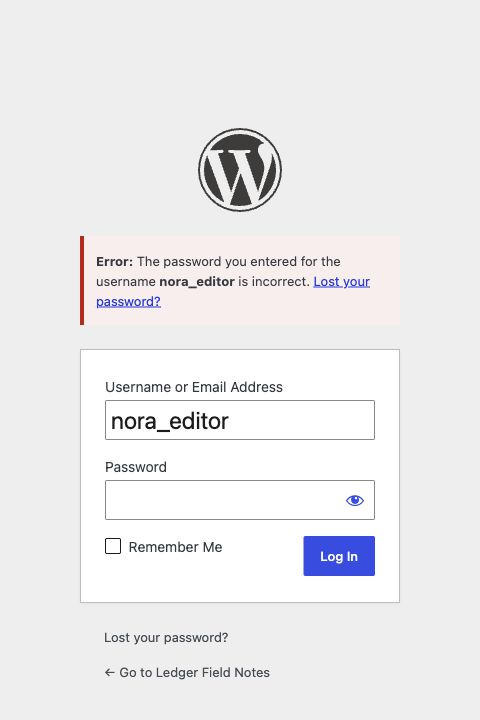
That default response is not a vulnerability by itself. It is the normal login experience. The risk appears when the same response stays available for a high volume of repeated attempts from the same visitor, especially when the target account has elevated privileges.
What Changed With Security by CleanTalk Enabled
After the plugin was turned back on, the same editor account was used for repeated invalid password attempts. The first failed attempts were recorded. On the next request after the configured threshold was reached, the visitor received a 403 block response from Security by CleanTalk.
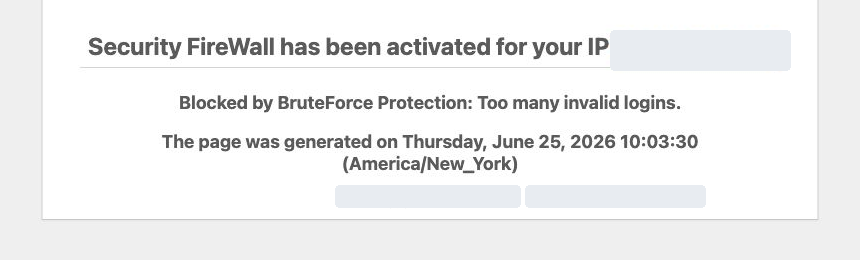
The important difference is not only the visual page. The login flow changes state. Instead of continuing to return the ordinary WordPress password error, the plugin switches the visitor into a blocked condition. The block page in this test stated that BruteForce Protection stopped the request because of too many invalid logins.
Security Log Evidence
The Security Log also recorded the activity. In the lab run, the editor account nora_editor showed Invalid password (3), which matched the configured limit. This gives an administrator an audit trail that can be reviewed after the event, not only a visible block page shown to the visitor.

The log is useful for operations because it ties the event to a user account, a time range, and an action. A site administrator can see which accounts were targeted and whether the activity was isolated or part of a broader pattern.
What The Feature Protects Against
Brute Force Protection helps reduce the window for repeated password guessing. It is especially relevant for public WordPress sites where the login URL is reachable and account names may be known through authorship, previous leaks, or normal editorial workflow.
- Password guessing against editor and administrator accounts.
- Credential stuffing where bots test reused passwords from other breaches.
- Low volume probing that repeats attempts during a short window.
- Operational blind spots where failed logins happen but no one checks server logs.
The feature does not replace strong passwords, two factor authentication, or least privilege roles. It adds a measurable control at the login boundary. The test also showed why the Security Log matters: the same protection that blocks the visitor also creates evidence that can guide a follow-up review.
Operational Takeaways
A practical threshold should reflect the site workflow. A small editorial site may accept a low limit because legitimate users rarely mistype the same password many times. A site with many users may choose a longer block period or a higher attempt limit to reduce support friction.
The tested configuration used a short block period so the lab could be repeated quickly. Production sites should choose values based on user volume, help desk process, and risk level. A useful starting point is to keep the feature active, review the Security Log after suspicious login events, and combine it with strong passwords and two factor authentication for privileged roles.
FAQ
Does Brute Force Protection replace two factor authentication?
No. It reduces repeated guessing at the login boundary, while two factor authentication adds a second proof after a password is submitted. The controls work best together for administrator and editor roles.
Can the threshold be changed?
Yes. The settings panel allows a site administrator to set the maximum authorization tries, the time frame for measuring attempts, and the block duration. The lab used a low threshold to make the test observable.
What does an administrator see after a block?
The Security Log records the failed authorization pattern. In the test, the log showed the editor account and the action Invalid password (3), which matched the configured threshold.
What happens without this protection?
The default WordPress login screen continues to show the ordinary invalid password error and remains available for another attempt. That is expected behavior, but it gives repeated guessing more room unless another control is present.
Summary
In this lab, Security by CleanTalk changed the WordPress login flow after repeated invalid passwords. The plugin recorded the attempts, applied the configured threshold, and returned a block page instead of letting the same visitor keep receiving normal login errors. For WordPress sites with public login pages and real editorial accounts, that combination of blocking and logging is the practical value of Brute Force Protection.