PHP2Shell is the name given to two critical vulnerabilities in the PHP engine itself — CVE-2026-109618 and CVE-2026-109619 — that can let an unauthenticated attacker run code on a web server. They are not WordPress bugs and not plugin bugs. That is exactly what makes them dangerous for WordPress: every WordPress site runs on PHP, and the flaws trigger before WordPress, its plugins or any security plugin get a chance to run. This article explains how critical PHP2Shell really is for WordPress sites, who is exposed, and what to do — in order of priority.
PHP2Shell quick facts
| CVE IDs | CVE-2026-109618, CVE-2026-109619 |
|---|---|
| Affected software | The PHP interpreter (all web SAPIs: Apache mod_php, PHP-FPM, php-cgi, LiteSpeed, FrankenPHP) |
| Severity | CVSS v4.0 9.2 (Critical) for both, per the PHP project |
| Authentication | None required |
| Impact | Remote code execution as the web server user; CVE-2026-109618 can also leak server memory |
| Fixed in | PHP 8.5.12, 8.4.27, 8.3.36, 8.2.35 (released October 21, 2026) |
| Exploited | Yes — attacks observed from the day of disclosure; added to CISA KEV on October 26, 2026 |
| WordPress-specific fix | None possible — the fix is updating PHP |
What PHP2Shell is
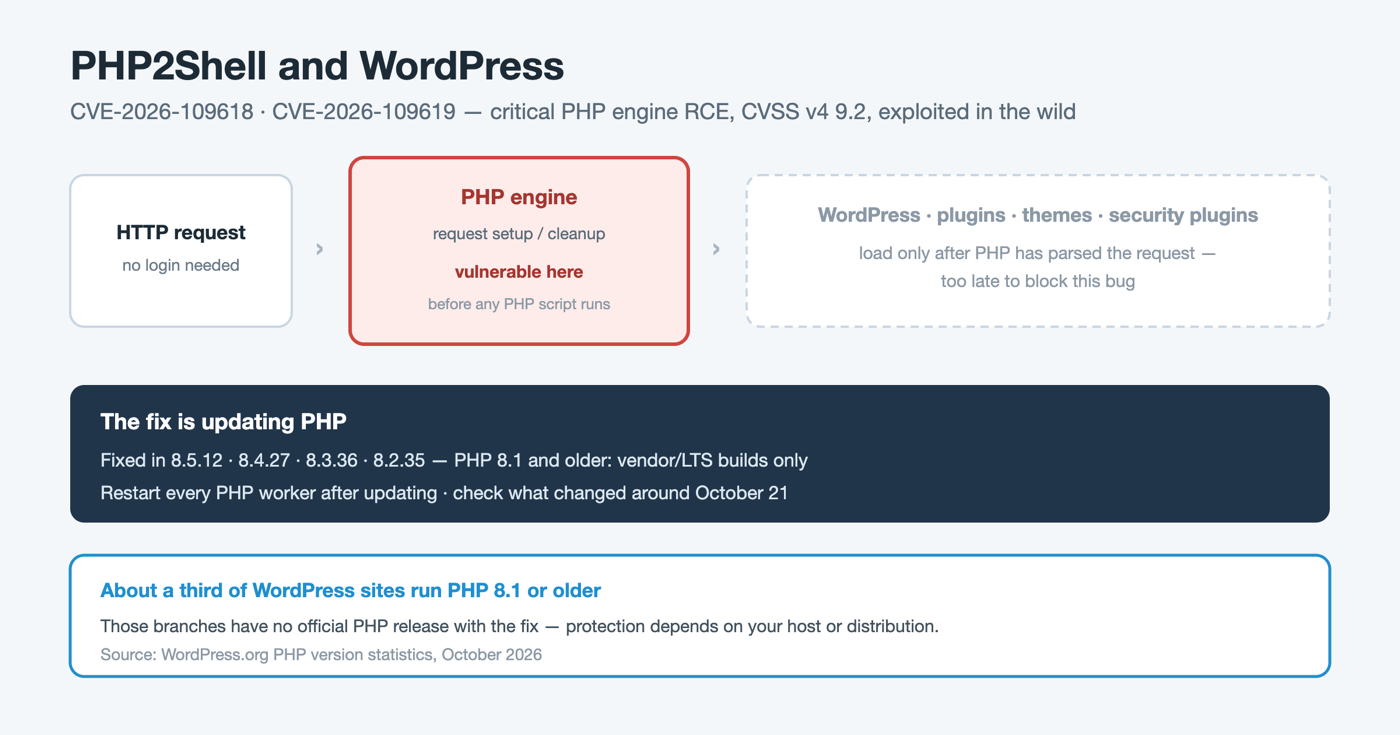
Both vulnerabilities are memory-safety bugs in how PHP sets up and tears down a web request — work the engine does before any PHP script, and therefore before any WordPress code, is executed.
- CVE-2026-109618 — if PHP runs out of memory part-way through preparing an incoming request, an internal data structure is left half-initialized, and the cleanup code later treats it as valid. Researchers also report that this bug can disclose fragments of server memory.
- CVE-2026-109619 — internal state from one request can outlive the memory it points to, so a later request handled by the same PHP worker acts on freed data (a use-after-free). One confirmed path runs through PHP’s session upload progress feature, which is enabled by default and runs even if the application never uses sessions.
Chained or used individually, these bugs can give an attacker code execution with the privileges of the PHP worker — on a typical WordPress host, the same user that owns wp-config.php and the wp-content directory.
How critical is it for WordPress sites?
Very critical for any site that has not updated PHP — and the WordPress ecosystem has a long tail of old PHP.
According to WordPress.org’s own usage statistics at the time of writing, WordPress sites run on these PHP branches:
| PHP branch | Share of WordPress sites | PHP2Shell status |
|---|---|---|
| 8.3 | ~27.4% | Fixed in 8.3.36 — update |
| 8.2 | ~23.1% | Fixed in 8.2.35 — update |
| 7.4 | ~15.0% | No official release; source backports or vendor/LTS packages only |
| 8.4 | ~10.2% | Fixed in 8.4.27 — update |
| 8.1 | ~9.5% | No official release; source backports or vendor/LTS packages only |
| 8.5 | ~5.8% | Fixed in 8.5.12 — update |
| 8.0 | ~3.5% | No official release; source backports or vendor/LTS packages only |
| 7.3 and older | ~5% combined | End-of-life, no fix from the PHP project |
In other words, roughly two thirds of WordPress sites are on a branch that has an official fixed release and simply needs updating, while close to a third run PHP 8.1 or older, where protection depends on the hosting provider or Linux distribution shipping a patched build — or on migrating to a supported PHP branch.
Three things make PHP2Shell worse for WordPress than a typical plugin vulnerability:
1. No login, no plugin, no special configuration of WordPress is needed. The vulnerable code runs on the request path before WordPress loads. 2. Your WordPress security stack cannot block it. A WAF or security plugin that runs inside WordPress — including ours — executes after PHP has already parsed the request, so it is too late to stop this class of bug. 3. Code execution on a WordPress host means full site compromise. The attacker can read wp-config.php (database credentials and secret keys), modify any file, plant backdoors, and pivot to other sites under the same hosting account.
Two caveats keep the picture accurate. Security researchers note that reliable exploitation depends on server conditions, and some early public proof-of-concept code did not work against a default PHP build. And code that claims to exploit PHP2Shell is circulating that may itself contain malware. Neither changes the conclusion: with confirmed in-the-wild exploitation and CISA KEV listing, unpatched PHP on a public WordPress site should be treated as an emergency.
How to check whether your WordPress site is affected
You need the PHP version that actually serves your website, which can differ from the version shown by php -v on the command line.
- From the WordPress dashboard: open Tools → Site Health → Info → Server and read PHP version.
- From your hosting panel: most hosts show the PHP version per site (cPanel Select PHP Version / MultiPHP Manager, Plesk PHP Settings, etc.).
- On your own server: check the package changelog of the PHP package your web server uses for CVE-2026-109618 and CVE-2026-109619. Linux distributions often backport the fix without changing the PHP version number, so an older-looking version can still be patched.
Your site is safe from PHP2Shell only if it runs 8.5.12, 8.4.27, 8.3.36, 8.2.35 or later on its branch, or a vendor build whose changelog explicitly lists both CVEs.
What to do: remediation priorities
1. Update PHP — this is the only real fix
- Managed / shared hosting: check your host’s status page or contact support and ask directly whether PHP2Shell (CVE-2026-109618, CVE-2026-109619) is patched for your plan. Many hosts patched centrally right after October 21.
- VPS / dedicated server: install the patched PHP packages from your distribution or vendor, or the fixed upstream release for your branch.
- PHP 8.1 and older: use a distribution or LTS vendor package that includes the fix, or — better — move the site to a supported branch (8.3 or 8.4). Test themes and plugins on a staging copy first.
- Restart every PHP worker after updating (PHP-FPM pools, Apache with mod_php, LiteSpeed). Updated packages do not fix processes that are already running. Rebuild container images that bundle PHP.
Note that PHP 8.4.27 and 8.5.12 shipped with a known SimpleXML crash regression from an unrelated fix; if a plugin that processes XML (feeds, importers, sitemaps) starts failing after the update, check for a newer point release rather than rolling back.
2. If you cannot patch today: temporary mitigations
These come from the PHP project and the researchers who analyzed the bugs. They reduce exposure but do not make an unpatched server safe, and they must be set in server-level PHP configuration (php.ini or the FPM pool), followed by a restart — not in WordPress or .htaccess files that load too late.
- Set session.upload_progress.enabled = 0. WordPress core does not use the session upload progress feature.
- On PHP 8.5 only, also set fatal_error_backtraces = 0.
- Enforce request body size limits at the web server or reverse proxy in front of PHP.
- If your site is behind Cloudflare or another edge WAF, enable its PHP2Shell rules. Note that they only protect traffic that actually goes through the edge — make sure the origin server is not reachable directly.
3. Check for signs of compromise
Because exploitation began around the disclosure date, sites that were unpatched in late October should be checked, not just updated:
- Unexpected new PHP files, especially in wp-content/uploads or wp-content/mu-plugins, and modified core or theme files.
- New administrator accounts or password changes you did not make.
- Unknown cron jobs (both WordPress cron and system cron) and outbound connections from PHP processes.
- In server logs: bursts of PHP workers crashing or hitting memory-limit fatal errors during request startup, unusually large or malformed POST requests, and — the strongest signal — the web server user launching shells or download tools.
If you find any of these, preserve logs and suspicious files before cleaning, then remove the backdoors, rotate the database password, all WordPress admin passwords and the secret keys and salts in wp-config.php, and rescan.
Does Security by CleanTalk protect against PHP2Shell?
We want to be direct about this: no WordPress security plugin can prevent PHP2Shell, including Security by CleanTalk. The vulnerable code runs inside the PHP engine before WordPress loads, so a plugin-level firewall never sees the request in time. The only prevention is updating PHP.
What Security by CleanTalk does help with is the part that comes after — finding out whether a site was hit:
- The Malware Scanner checks the site’s PHP files with signature and heuristic analysis and flags web shells and obfuscated loaders that attackers drop after gaining code execution.
- The File System Watcher keeps snapshots of the site’s PHP files and shows exactly which files were added or changed between two dates — useful for spotting what changed around October 21 — see our guide on WordPress file integrity monitoring.
- The Security Log records logins and admin activity, which helps reveal rogue administrator accounts.
For background on what attackers typically leave behind, see malicious mu-plugins backdoors and the major signs of malware on an infected WordPress site.
Frequently asked questions
Is PHP2Shell a WordPress vulnerability?
No. It is a vulnerability in the PHP interpreter that WordPress runs on. WordPress, its plugins and themes do not need to contain any bug for a site to be exposed, which is also why there is no WordPress update that fixes it.
Which PHP versions fix PHP2Shell?
PHP 8.5.12, 8.4.27, 8.3.36 and 8.2.35, released on October 21, 2026, or a distribution or vendor build that lists CVE-2026-109618 and CVE-2026-109619 in its changelog. PHP 7.4 through 8.1 have no official release from the PHP project, and PHP 7.3 and older will not be fixed by the project at all.
My host says I am on PHP 8.2.20 — am I vulnerable?
Probably, unless your host’s PHP package includes a backported fix. Ask your host to confirm in writing whether CVE-2026-109618 and CVE-2026-109619 are patched; version numbers alone are not conclusive when distributions backport fixes.
Can a security plugin or WordPress firewall block PHP2Shell?
No. Plugin-level firewalls run inside WordPress, after PHP has already parsed the request. Edge WAFs such as Cloudflare can filter some attack traffic before it reaches the server, but only for traffic routed through them, and they are a stopgap, not a fix.
Is PHP2Shell being exploited?
Yes. Exploitation attempts were reported from around the disclosure date, and CISA added both CVEs to its Known Exploited Vulnerabilities catalog on October 26, 2026.
I updated PHP. Do I still need to do anything?
Restart all PHP workers so the new code is actually running, then check the site for signs of compromise if it was unpatched in late October. Updating stops new attacks; it does not remove a backdoor planted before you updated.
Key takeaway
PHP2Shell turns the one component every WordPress site depends on — PHP — into the entry point. It needs no login and no vulnerable plugin, and WordPress security plugins cannot block it. Check the PHP version your site actually runs today, update it or get confirmation from your host, restart PHP, and then check the site for anything that changed around October 21.
Sources and references
- Tenable — PHP2Shell FAQ
- Datadog Security Labs — PHP2Shell analysis
- watchTowr — PHP2Shell exploitation and timeline
- Sansec — PHP2Shell research
- Ubuntu — PHP2Shell fixes
- WordPress.org — PHP version statistics
Sign up for CleanTalk — free trial — malware scanning, file integrity monitoring, firewall and 2FA for your WordPress site.