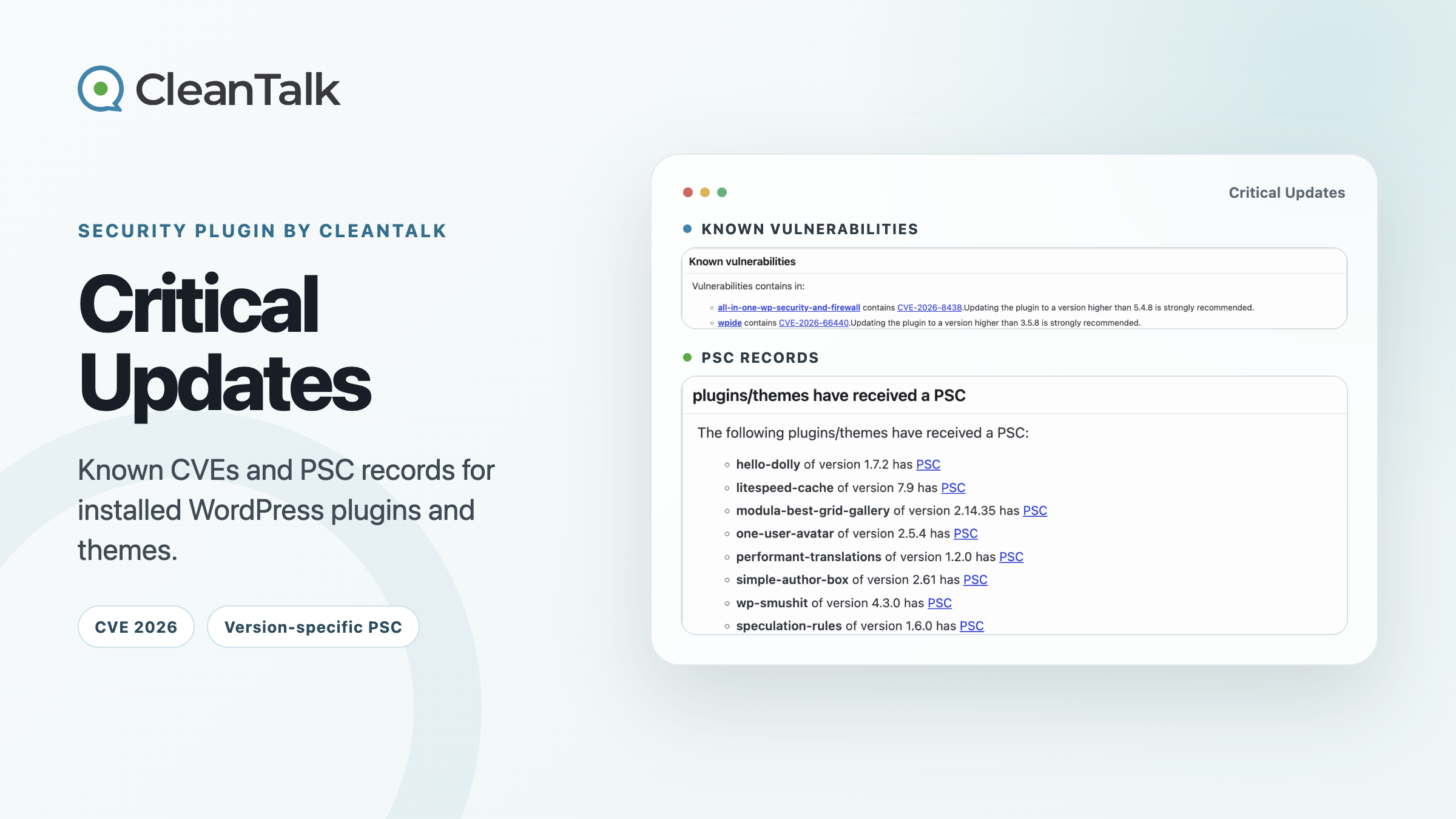
Security Plugin by CleanTalk (SPBCT) gives WordPress administrators a more useful answer than “an update is available.” Its Critical Updates tab shows installed plugin and theme versions that match known vulnerability records. On the same page, a separate block lists versions associated with CleanTalk Plugin Security Certification records.
Those are two independent lists. A plugin in the PSC block is not a patched replacement for a plugin in the CVE block, and the two lists should not be read as pairs. Known vulnerabilities reports risk in an installed version. A PSC match points to a version-specific certification record that must be checked on its own terms.
What SPBCT Critical Updates checks
Install Security Plugin by CleanTalk, then open Settings > Security by CleanTalk > Critical Updates. In SPBCT 2.186, the code behind this tab reads the installed plugin and theme inventory and sends identifying data, including slugs and versions, to the CleanTalk API. The response supplies the vulnerability and PSC matches shown in WordPress.
The scope is specific: Critical Updates checks installed plugins and themes, not WordPress Core. Core updates still need to be reviewed through the standard WordPress update workflow. CleanTalk Research also publishes broader WordPress security research, but a core vulnerability article should not be taken as evidence that this particular SPBCT screen checks Core.
Known vulnerabilities
The installed plugin or theme version matches an affected range in the CleanTalk vulnerability data. Open the CVE or research link, confirm the fixed boundary, then update or mitigate the affected component.
PSC records
The current inventory produced a match with a CleanTalk PSC record. Open the linked record and verify its exact certified version, date, and scope before using it as a security signal.
SPBCT Critical Updates: CVE and PSC results
SPBCT checked 17 installed plugins and themes, with two known vulnerability matches and eight PSC matches. These lists are independent. The PSC entries are not fixes for All-In-One Security or WPIDE.

How to read the Known vulnerabilities block
CVE stands for Common Vulnerabilities and Exposures. A CVE identifier gives researchers, vendors, and defenders one stable name for a disclosed security issue. The identifier alone is not a patch instruction. Administrators still need the affected version range, the first fixed release, and any conditions required for exploitation.
The first Known vulnerabilities entry was All-In-One Security 5.4.7, matched to CVE-2026-8438. This high-severity issue is an unauthenticated stored cross-site scripting flaw. It affects versions through 5.4.7 when REST access for logged-out users and debug logging are enabled. A crafted request path can be stored in the debug log and execute when an administrator views that log. The affected range ends at 5.4.7, making 5.4.8 the first release outside that range.
The second result linked WPIDE to CVE-2026-66440, another unauthenticated cross-site scripting issue. The official record marks versions through 3.5.7 as affected and 3.5.8 as unaffected. The SPBCT interface uses the wording “higher than” for both recommendations. When that wording and the vulnerability record differ, the exact affected range in the record is the safer source for the remediation boundary. Installing the latest supported release remains the practical choice.
A red entry means the installed version falls inside a known affected range. It does not prove that the site has already been compromised, but it does give the administrator a concrete update or mitigation task.
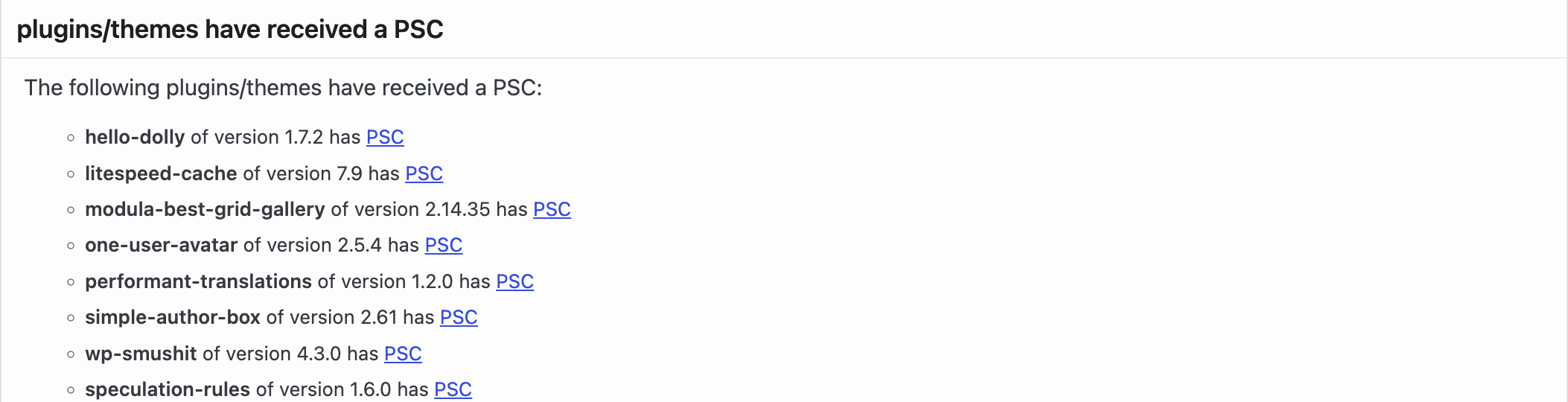
What “plugins/themes have received a PSC” means
PSC means Plugin Security Certification. CleanTalk specialists review an exact submitted plugin version for issues such as SQL injection, cross-site scripting, CSRF, access-control flaws, unsafe file operations, and code execution. A PSC records the checks performed on that release at the certification date. It is not a permanent guarantee that no vulnerability exists.
The PSC block displayed eight installed versions, including Hello Dolly 1.7.2, LiteSpeed Cache 7.9, Modula 2.14.35, One User Avatar 2.5.4, Performant Translations 1.2.0, Simple Author Box 2.61, Smush 4.3.0, and Speculation Rules 1.6.0. The linked PSC record identifies the certified version, publication date, and review scope.
A later release contains different code, so certification does not automatically carry forward. If the version shown in the dashboard differs from the version named in the linked PSC record, use the record as the authoritative description of the certified release and recheck the dashboard data. A newly published CVE also takes priority over an older PSC record for the same version.
The CleanTalk vulnerability and certification database makes both record types searchable. A concrete PSC example is Speculative Loading 1.6.0, PSC-2026-64620. It shows the exact release and the review context instead of applying a broad “safe plugin” label to every version.
Using CVE warnings and PSC records in maintenance
- Review every item in Known vulnerabilities first. Open the linked record and note the affected and fixed versions.
- Update the affected component. For business-critical plugins, apply the change on staging and verify the site’s essential workflows before deployment.
- If no fixed release exists, disable or remove the component, or apply the mitigation given in the research record.
- Review PSC entries separately. Confirm that the record covers the exact release under consideration and treat it as one point-in-time security signal.
- Return to Critical Updates after plugin or theme changes and check the report timestamp.
By August 2026, CleanTalk researchers had worked on more than 500 CVE disclosures across WordPress plugins, themes, and related web applications. That research feeds the records used by SPBCT. For another example of how those records affect day-to-day administration, see how a known plugin CVE changes the CleanTalk Safety Score.
Questions about SPBCT Critical Updates
Does Critical Updates check WordPress Core?
No. In SPBCT 2.186, this tab checks the installed plugin and theme inventories. WordPress Core updates must still be handled through the normal WordPress update process.
Are PSC plugins replacements for the vulnerable plugins?
No. The CVE and PSC blocks are independent. A PSC entry does not identify a substitute for any item in Known vulnerabilities.
Does PSC certify a plugin forever?
No. A PSC applies to the version named in its record and reflects the stated checks at the certification date. Later code needs its own evaluation.
Should every plugin with a CVE be removed?
Usually the first step is to install a fixed release. Removal is appropriate when no safe update is available, the plugin is abandoned, or the risk cannot be mitigated.
WordPress site owners
Check your site before the next update
Install or open SPBCT, go to Critical Updates, and review the Known vulnerabilities list before the next maintenance window.
Plugin developers
Submit a plugin release for PSC
Send a specific plugin release for CleanTalk Plugin Security Certification and give users a version-specific review record they can inspect.

