SC WordPress malware is CleanTalk’s label for a newly observed group of polymorphic PHP loaders, persistence injections, and packed backdoor components. Observed variants differ in identifiers, numeric offsets, delimiters, request-gate arithmetic, whitespace, line endings, and file paths. Those changes make literal string matching unreliable, while important behavioral relationships remain available for structural detection.
According to CleanTalk’s incident intake record, the first samples in this investigation were received on August 6, 2026. Three CODE_PHP malware signatures were submitted on August 7 and shown as verified in the cloud snapshot updated on September 10. This report examines the observed components, the files in which they appeared, and controlled detection and Cure tests on an isolated WordPress site.
In Brief
- What was observed. Related SC components appeared as bounded injections in legitimate WordPress files and as standalone PHP loaders with changing names.
- Where it appeared. Examples included functions.php, wp-content/db.php, wp-content/advanced-cache.php, and randomly named files such as 1j2d192.php.
- What CleanTalk verified. Current cloud signatures detected one representative from each of three SC-labelled production rows with heuristic analysis disabled.
- What the malware did in a controlled run. The persistence components copied PHP into mu-plugins, while the packed component registered 37 callbacks, moved itself into mu-plugins, created an administrator account, and attempted outbound communication that the lab kernel rejected.
- What Cure demonstrated. The live plugin marked all three representatives as CURED. A follow-up scan found no remaining SC detections in the repaired files, and all three passed PHP syntax validation.
- What site owners should do. Preserve evidence, inventory every related component, close the original access path, rotate credentials, and scan again after cleanup.
What Is SC WordPress Malware?
SC is CleanTalk’s internal family label. It is not a known public acronym. This report focuses on three verified SC-labelled signature rows shown in the September 10 snapshot.
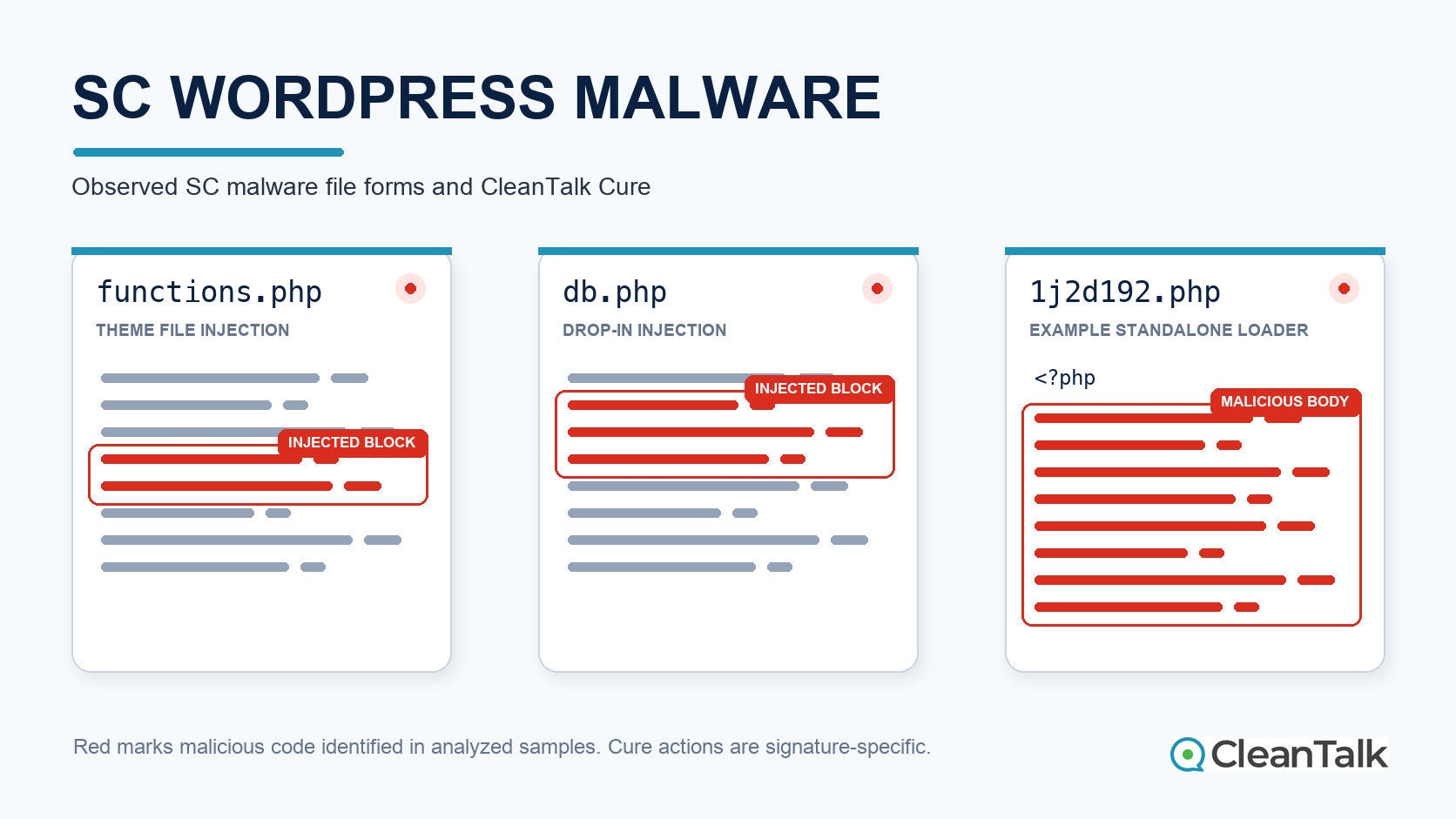
- Paired dropper block. A bounded persistence injection can be added to an otherwise legitimate PHP file. Observed targets include wp-content/db.php, wp-content/advanced-cache.php, and active theme functions.php files.
- Structural standalone loader. A complete PHP file acts as a remote loader. Observed variants change identifiers and arithmetic while retaining linked request decoding, validation, retrieval, and execution behavior.
- Packed backdoor component. A packed WordPress-aware component contains request-gated behavior together with persistence logic. It may remain quiet during ordinary requests, but the available evidence does not reduce it to one mandatory final stage or one request path.
Their co-occurrence is consistent with a related toolkit. The available artifacts do not prove that every infection follows one fixed three-stage sequence.
The distinction between a complete malicious file and an injected block matters for repair. A standalone malicious body can be removed while preserving the PHP prolog. An injection inside legitimate application code requires verified start and end boundaries so the surrounding file remains functional.
How the Observed SC Components Behave
1. Related components appear in WordPress execution paths
Related components were observed in db.php, advanced-cache.php, theme functions.php files, and randomly named PHP paths under cache or hidden content directories. This co-occurrence is consistent with multiple persistence points, but the available snapshots do not establish the order in which the files were written.
The db.php and advanced-cache.php drop-ins are particularly valuable to an attacker because WordPress can load them during bootstrap before ordinary plugins. Theme functions.php files are also executed routinely, although they do not share the same early drop-in position.
Some SC observations coincided with the investigation of the WP2Shell WordPress RCE chain, but the available malware samples do not establish WP2Shell as the initial access vector. Malware code alone cannot identify the exploit that wrote it. Server access logs, vulnerable component versions, request traces, and file timestamps are still required. CleanTalk’s separate WP2Shell technical analysis explains that RCE chain in detail.
2. The bounded dropper supports persistence
The validated SC_ADV block uses linked markers and a consistent set of behaviors. The analyzed sample references shared memory, archive extraction, database option recovery, and a plugin load hook. Those relationships can help another malicious component survive or return after partial cleanup.
Deleting only the most obvious randomly named PHP file is therefore insufficient when another verified persistence component remains.
3. The structural loader decodes its vocabulary
The loader avoids plain, readable function names. It builds a character table, converts numeric sequences into function names, and uses computed indexes to call them. Across observed variants, identifiers and numeric values change while the tested structural relationships remain stable.
After decoding, the loader reads a specially structured request value, unpacks it, validates timing and a digest, and selects a remote location. It first attempts one retrieval method and then falls back to another. The downloaded response is decoded and passed to dynamic PHP execution.
This design makes basic literal signatures unreliable and allows the remote payload to remain off the compromised server until the expected request gate is satisfied.
4. The packed component combines gating and persistence
The packed component is intentionally difficult to read and can remain quiet during ordinary page views. The representative tested in the live scanner was a large WordPress-aware file with both request-gated and persistence-related behavior. It should not be treated as proof of one universal final-stage design.
Indicators of SC WordPress Malware
Observed indicators include unexpected PHP blocks in wp-content/db.php or wp-content/advanced-cache.php, unfamiliar code in an active theme’s functions.php, randomly named PHP files such as 1j2d192.php, and components that return after only one stage is removed.
These indicators warrant investigation, but no filename, path, encoded string, or risky PHP function is sufficient by itself to identify SC. A legitimate plugin can use functions such as curl_exec() or base64_decode(). Detection requires the connected program structure and behavior.
Why Polymorphism Makes Detection Harder
A weak signature may depend on a variable name, a fixed hash, one encoded value, or a predictable filename. The observed SC variants can change those values. A broad signature based only on risky functions creates the opposite problem because legitimate WordPress extensions can use the same primitives.
Reliable detection therefore follows linked structural evidence. For the tested loader, that evidence includes the numeric decoder and its character table, request-gate handling, retrieval fallback, time and digest checks, dynamic execution, and the terminal invocation. For a bounded persistence injection, linked markers are combined with multiple behavior invariants. The reported tests do not establish coverage for arbitrary method reordering or every future rewrite.
Observed SC Activity Through September 10
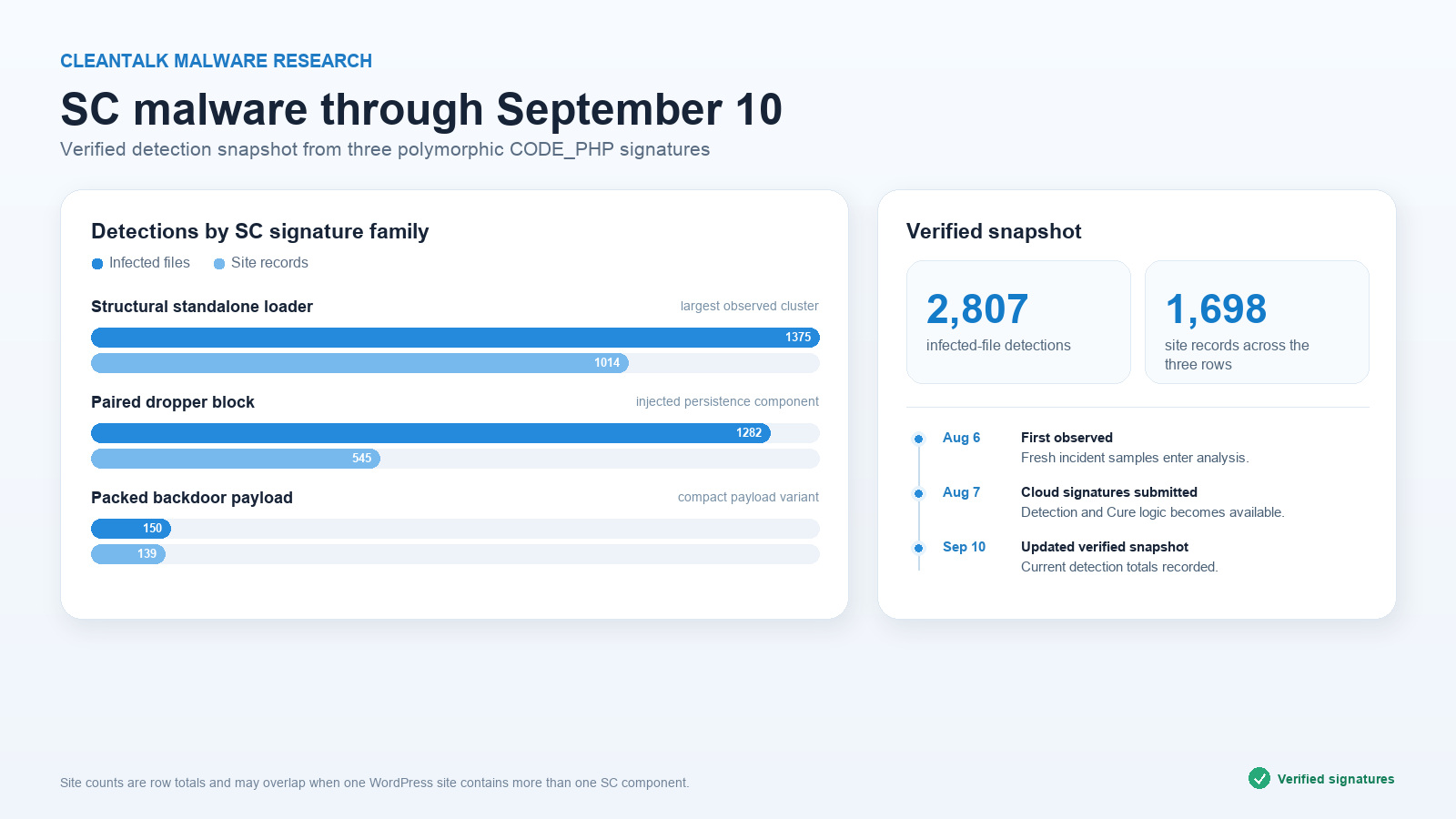
The September 10 verified snapshot showed 1,375 infected-file detections across 1,014 site-signature rows for the structural standalone loader, 1,282 files across 545 rows for the paired dropper block, and 150 files across 139 rows for the packed backdoor component.
The combined snapshot contains 2,807 infected-file detections and 1,698 site-signature rows. It should not be read as 1,698 confirmed unique websites because one WordPress installation can contribute more than one row when multiple SC components are detected.

The incident intake record places the first received samples on August 6. The cloud rows were submitted on August 7, then verified and updated through September 10. This timing documents a rapid response to newly received samples without claiming that the snapshot captures every affected site.
Live Production-Signature Test on WordPress
The controlled live test used WordPress 7.0.3 with Security by CleanTalk 2.185. The plugin synchronized 1,850 cloud signatures, including the three verified SC rows. Signature analysis was enabled and heuristic analysis was disabled. Automatic Cure was initially disabled so the detected state could be captured before repair.
Three representative copies were placed in a non-public test directory. The files remained visible to the scanner but could not be requested through the site. This detection capture was kept separate from the disposable runtime observation below.
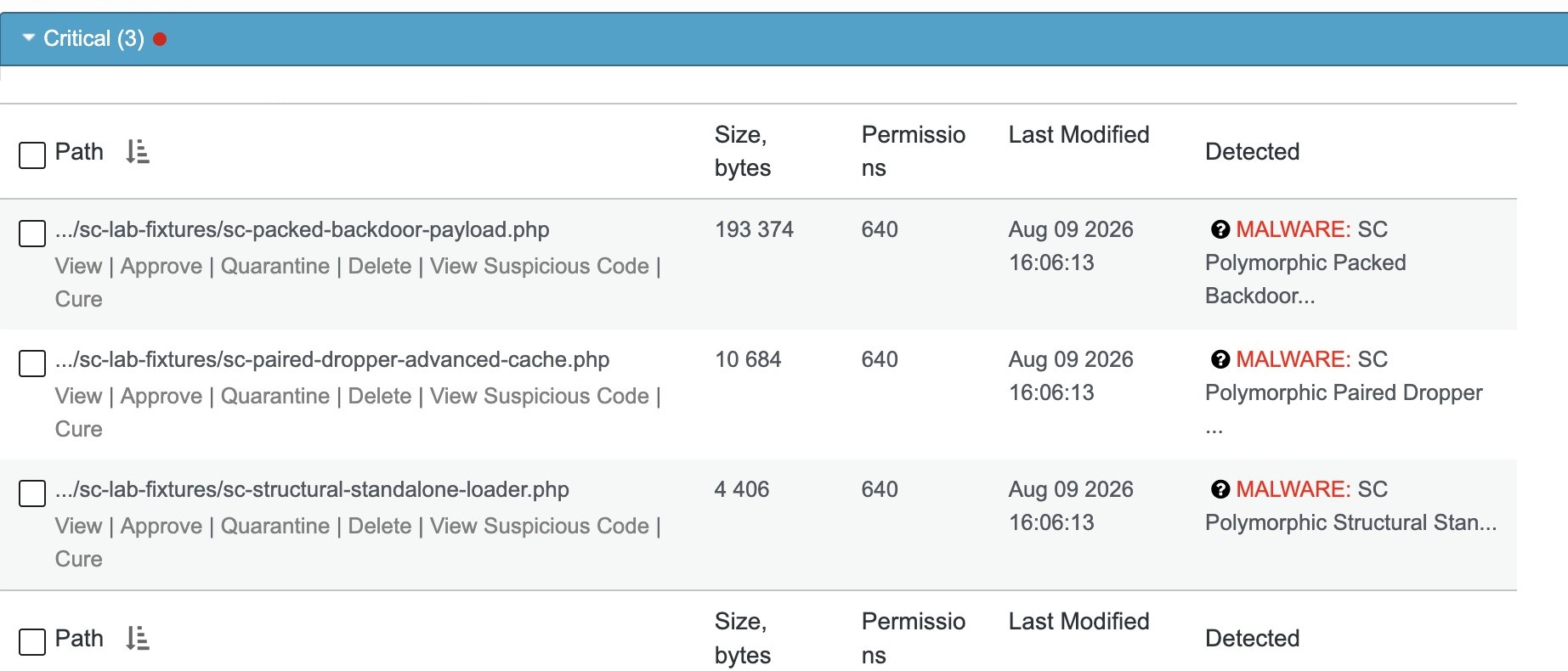
The live scan detected one representative for each verified production row: the packed backdoor component, paired dropper block, and structural standalone loader. This result came from the signature subsystem alone.
What the SC Malware Did in a Controlled WordPress Lab
A separate runtime observation used a disposable WordPress 7.0.3 site and a dedicated database on the test host. The original malware files were verified by SHA-256 before the run. They executed as an unprivileged account with the production website hidden, only the disposable lab writable, and both IPv4 and IPv6 socket families denied by systemd. A control check confirmed that TCP and DNS could not leave the sandbox: the kernel rejected the calls with EAFNOSUPPORT. A clean WordPress control then exercised the same common hooks for comparison.
- Paired dropper block. With only a known inert PHP file available in the expected local archive, the block restored that file to wp-content/mu-plugins/xenon-beacon-jet.php and registered one load hook. The source and installed SHA-256 values matched.
- Structural standalone loader. With the same inert file placed in the local plugin path the sample searches, the loader copied it to wp-content/mu-plugins/grid-updater-hq.php, set mode 0644, and preserved the SHA-256 value.
- Packed backdoor component. During a WordPress bootstrap and five common hooks, it registered 37 callbacks across 27 hook names. It moved its unchanged body from a normal plugin directory to wp-content/mu-plugins/metro-feeder-mod.php, created one additional administrator in the disposable database, and stored persistence state in WordPress options.
- Blocked network behavior. The packed run produced 147 rejected IPv4 or IPv6 socket calls, compared with 21 in the clean WordPress control. Kernel enforcement rejected every attempt before connection establishment, so the observation remained limited to first-stage behavior.
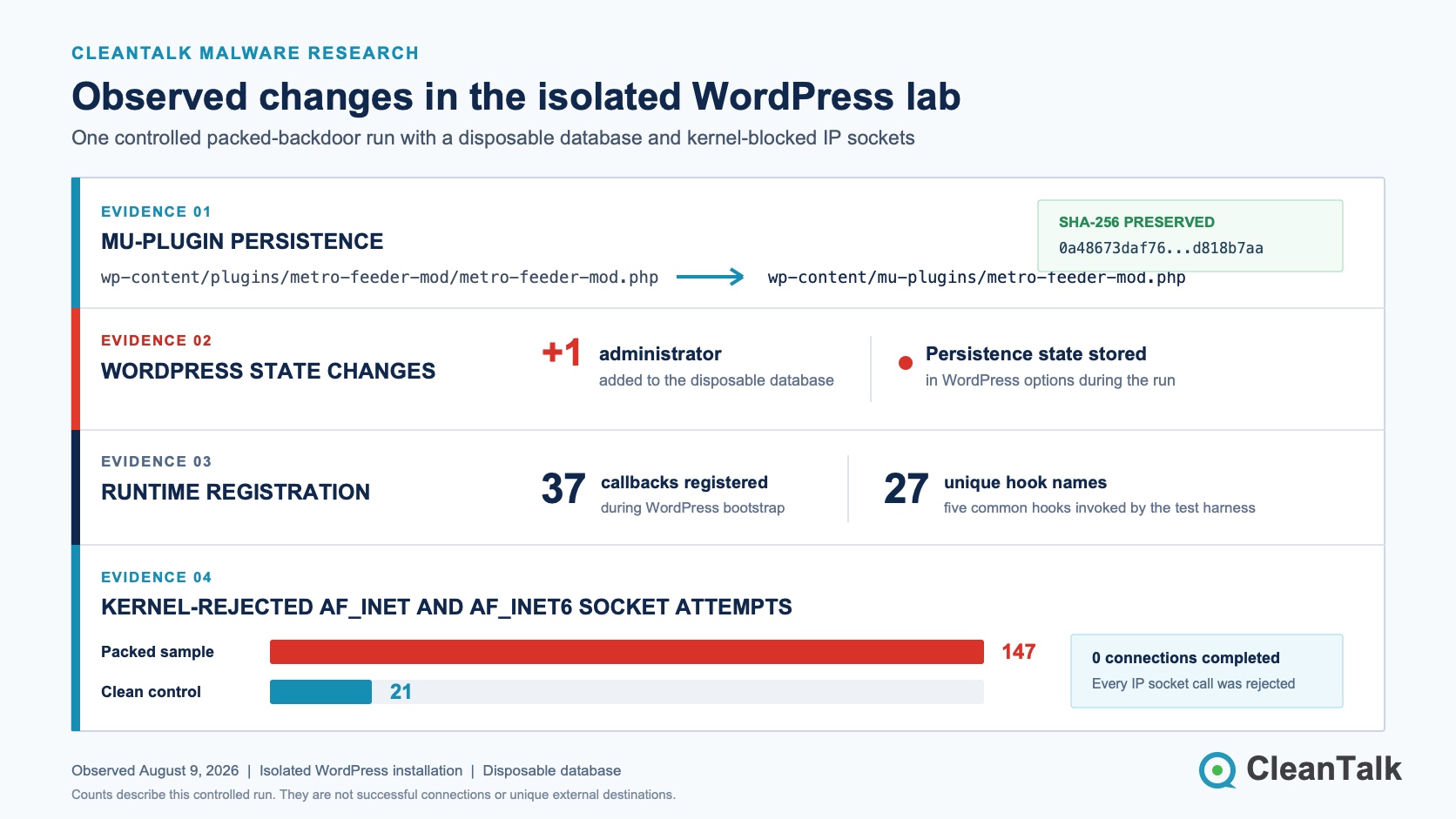
This public report summarizes the observed persistence and communication behavior without reproducing request-gate material, outbound destinations, or account credentials.
How CleanTalk Cure Repairs an SC Match
Security by CleanTalk stores a Cure instruction with supported signatures. When the scanner finds a supported match, the repair stage creates a backup and replaces the matched range with a short CleanTalk repair comment.
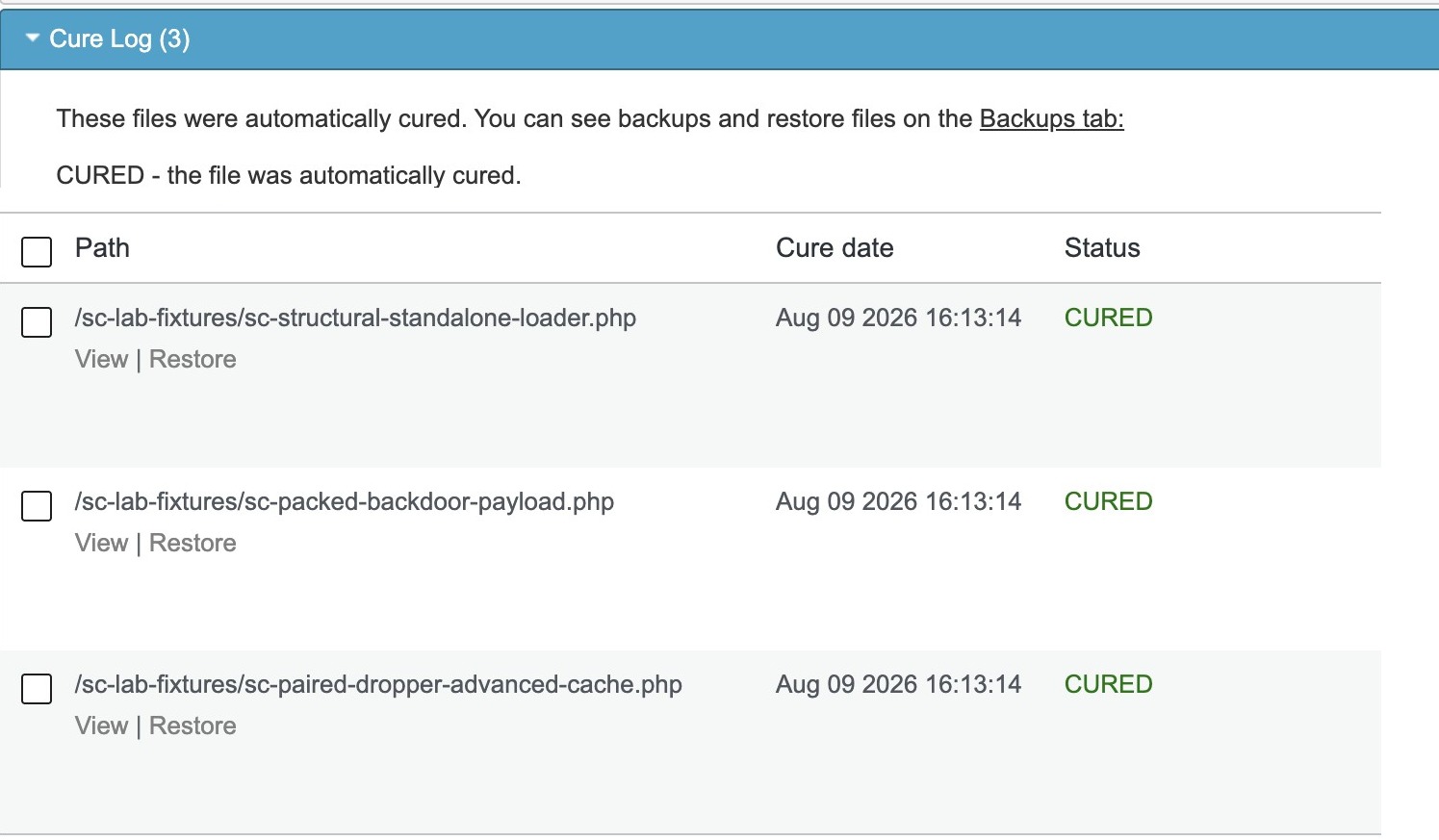
The live Cure Log recorded the three production representatives as CURED, with zero reported Cure failures. Post-Cure checks found no remaining SC detections in those three files, and all three passed PHP syntax validation.
How to verify a WordPress site after Cure
- Open the Cure Log and confirm that each affected path has a CURED result and an available backup.
- Run a complete malware scan again and investigate every remaining Critical item.
- Open the public site and WordPress administration area, then test the active theme, database access, cache, and other important paths.
- Recheck functions.php, wp-content/db.php, wp-content/advanced-cache.php, and unexpected PHP files for new changes.
- Monitor the site for recreated files. A returning component can indicate surviving persistence or an entry point that is still open.
Does Cure Delete the Whole File?
Not necessarily. The action is specific to the matched signature. Depending on the malware form, Cure can neutralize a known malicious body or remove a matched injection from a larger file.
Security by CleanTalk creates a backup and records the result in the Cure Log. Site owners should still review the repaired path, test the website, and run another complete scan before considering the incident closed.
What Site Owners Should Do After an SC Detection
Automatic repair removes the matched code. It does not prove that the original entry point has been closed. A complete response should follow this order.
- Preserve access logs, file timestamps, and a filesystem and database backup.
- Restrict public access if active compromise is suspected.
- Run a complete scan and inventory every related component.
- Update WordPress, plugins, and themes, then replace modified public files with verified originals where appropriate.
- Rotate WordPress administrator, hosting, database, SSH, and deployment credentials.
- Review accounts, application passwords, scheduled tasks, database triggers, MU plugins, and the observed SC locations.
- Run another complete scan and monitor for recreated files.
Concerned that a WordPress site may be affected? Get Security by CleanTalk and run a complete scan, then read the Malware Auto-Cure guide before applying a supported repair.
If the infection is widespread, keeps returning, or includes files without an automatic Cure action, request the CleanTalk Expert-Driven WordPress Malware Removal service. CleanTalk specialists inspect the site, remove malicious code, restore normal operation, and provide an issue analysis report.
Frequently Asked Questions
What files does SC WordPress malware target?
Observed samples appeared in db.php, advanced-cache.php, theme functions.php files, cache directories, hidden dot-prefixed PHP files, and randomly named standalone loaders such as 1j2d192.php. The family is defined by behavior, not by one path.
Can changing variable names evade the SC signatures?
The tested signatures do not depend on fixed variable names alone. They match connected program structure and behavior. Continued sample review and cloud updates remain important because no signature can promise detection of every future rewrite.
Does CleanTalk Cure remove legitimate WordPress code?
The live plugin reported all three tested production representatives as CURED. The repaired files had no remaining SC detections and passed PHP syntax validation. Because every signature has its own repair action, site owners should review the Cure Log, keep the backup, test the website, and scan again.
Can the malware return after Cure?
Yes. Reinfection can follow if another persistence component survives or the original vulnerability or stolen credential remains usable. Cure should be followed by updates, credential rotation, log review, and another complete scan.
Is heuristic analysis required for the tested SC representatives?
No. The three live representatives were detected by synchronized CODE_PHP signatures with heuristic analysis disabled. Heuristics can provide additional coverage for unrelated or previously unknown code, but they were not part of the reported result.
Is CleanTalk Malware Cure free or paid?
The Security by CleanTalk WordPress plugin is free and open source. It works with the CleanTalk Cloud Security service. After the trial, continued access to the cloud-backed Security service requires an active subscription. Current pricing and feature availability should be checked on the official CleanTalk Security page.
Key Takeaway
The observed SC toolkit combines WordPress persistence, polymorphic loader behavior, request gating, and packed backdoor logic. Detection depends on linked structural evidence rather than a filename or variable name. Cure can remove supported signature matches, but a complete response must also verify the repaired site and close the original entry point.



Hi CleanTalk research team,
I’m following up on your published research: “SC WordPress Malware in functions.php,
db.php & 1j2d192.php” (research.cleantalk.org/sc-wordpress-malware-functions-db-random-php-loader-cure/).
We handled a real-world incident on a WordPress/WooCommerce site (Plesk/VPS,
~August 2026) with this exact malware family (same obfuscation markers:
SC_TH_BEGIN/END, SC_DB_BEGIN/END, SC_ADV_BEGIN/END, versioned e.g. “4.0.3” plus a
random hex install ID). The site is anonymized here since it’s a client site, but
I wanted to share two mechanisms we found that go beyond what’s described in your
article, in case they’re useful to your detection signatures.
1) DATABASE-RESIDENT PAYLOAD (survives full file-level cleanup)
We found the persistence isn’t limited to the known files (db.php,
advanced-cache.php, mu-plugins/.php, theme functions.php, random-hex .php
loaders/droppers, .user.ini with auto_prepend_file). The malware also stores its
full payload directly in wp_options, read by the malicious advanced-cache.php
drop-in on every request to regenerate the rest of the mesh. This is why
repeated, technically-correct file-level cleanups kept failing — the very next
request repopulated everything from the DB.
Indicators found in wp_options:
– 12 options with random lowercase hex names, 6-20 characters
(e.g. pattern: ^[a-f0-9]{6,20}$), holding ~500 KB combined of obfuscated/
compressed payload (some gzip+base64 with an “H4sI…” prefix, others using a
per-instance character-substitution cipher — key regenerates on every
reinfection, so a key extracted from one instance won’t decode another).
– Non-transient (non-expiring) control options: sc_initialized, sc_last_rpc,
sc_last_fetch_ts, sc_last_rescan, sc_last_recovery_check,
sc_payload_persistent, sc_persist_manifest.
– Transients (with matching _transient_timeout_ pairs): sc_admin_tick, sc_guard,
sc_migration_timeout, sc_payload_t, sc_recover_check, sc_spread_interval.
– One of the decoded blobs stored under _transient_sc_payload_t contained
obfuscated literal JavaScript — we could not confirm it was actively injected
into front-end pages at the time of discovery, but the capability to serve a
client-side payload (potential checkout/card skimmer on WooCommerce) appears
built in.
– A “magic” GET/POST parameter, format ?sc_[a-z0-9]{6}=1, handled directly by the
malicious drop-ins before WordPress loads — behaves as a live beacon/C2
endpoint (200 OK with ~30-90 KB of content while the mesh is present; reverts
to normal 302/404 once cleaned). Worth adding as a WAF/scan signature
(regex: \?sc_[a-z0-9]{6}=1).
2) C2 VIA BLOCKCHAIN RPC (“EtherHiding” style)
The option `sc_last_rpc` held a literal URL to a public Ethereum RPC gateway
(https://0xrpc.io/eth). Decoding one of the larger payload blobs (a full
obfuscated fake-plugin file, ~184 KB once decoded, disguised with a fake plugin
header) revealed a hardcoded list of **19** public Ethereum RPC gateways used as
rotating/redundant channels to read instructions from what is almost certainly a
smart contract — consistent with the EtherHiding technique tracked by
Google/Mandiant under cluster UNC5142. Full list, in case it’s useful for
detection/blocklists:
https://0xrpc.io/eth
https://eth-mainnet.public.blastapi.io
https://eth-mainnet.rpcfast.com
https://eth.api.onfinality.io
https://eth.api.pocket.network
https://eth.blockrazor.xyz
https://eth.drpc.org
https://eth.merkle.io
https://eth.rpc.blxrbdn.com
https://eth1.lava.build
https://ethereum-json-rpc.stakely.io
https://ethereum-public.nodies.app
https://ethereum-rpc.publicnode.com
https://ethereum.public.blockpi.network
https://ethereum.rpc.subquery.network
https://gateway.tenderly.co
https://mainnet.gateway.tenderly.co
https://public-eth.nownodes.io
https://rpc.eth.gateway.fm
https://rpc.sentio.xyz
All 19 are legitimate third-party RPC providers being abused as transport, not
compromised themselves — blocking only the one seen active in DNS/traffic logs
left the other 18 available as fallback, so we recommend blocking the full set.
3) OTHER NOTES THAT MATCHED PUBLICLY-DOCUMENTED BEHAVIOR (not new, but confirms
your write-up + other researchers’ findings)
– Hidden admin account technique: a fully-privileged admin account invisible in
wp-admin’s user list and in `wp user list –role=administrator`, because its
capabilities were stored in usermeta under the DEFAULT `wp_capabilities` meta
key instead of the site’s actual custom table prefix. Matches technique
described by other vendors (Bitdefender/Sucuri/Check Point) for similar
WordPress backdoors. We also found a `_pre_user_id` option in wp_options
pointing to that account’s ID, left behind after a partial manual cleanup
attempt — worth checking for as an orphaned residue even after the account
itself is gone.
– Two randomized wp_cron hook names alongside the known `sc_cron_fetch` hook,
registered via wp_schedule_event() wrapped in
if (!wp_next_scheduled($hook)) — i.e. scheduled once, not re-armed on every
page load. The system-level cron running wp-cron.php (not visitor traffic) is
what actually triggers redeployment once the scheduled time arrives.
– Fake plugin files: one decoded payload carried a fully-formed fake plugin
header (“Plugin Name: …”, fictitious GitHub URI, GPL license, etc.) as
camouflage — worth noting for anyone eyeballing plugin headers as a triage
shortcut, since this family fakes them convincingly.
Happy to share more detail (decoded payload structure, obfuscation key-extraction
method) if useful for your write-up. No live sample attached here since I don’t
want to distribute working malicious code over email — let me know if you’d like
it through a different channel.
Thanks for maintaining the public research on this family — it was the single
most useful reference during incident response.
Hi there,
Thank you for your experience. We will add a new info about this incident in the article + mention you 🙂
Pingback:The New Wave of “Self-Healing” WordPress Malware Is Getting Scary – WP Minutes
Pingback:Disable PHP Execution in WordPress Uploads | CleanTalk
Pingback:Force WordPress Users to Log Out | CleanTalk Shuffle Salts
Hi there!
I’d like to provide some additional information on the SC Malware / WordPress Backdoor as I’ve researched the malware during an incident in early September. I coined it SC Factory X back then due to a fake plugin name. I reverse engineered it and also wrote a decryption tool as a POC to show how the malware decrypts the data from the Etherhiding technique, without a researcher having to run the malware themselves.
The whole repository can be found here:
Github: https://github.com/sonofenders/sc-factory-x-malware-analysis
Decryptor: https://github.com/sonofenders/sc-factory-x-malware-analysis/tree/main/decrypt
Reddit post writeup: https://www.reddit.com/r/MalwareAnalysis/comments/1wdv4ou/sc_factory_x_a_wordpress_backdoor_that_hides_its/
Please feel free to use it and share possible IOCs and such, or update the blogpost with info from this repo if necessary.
Good read!
Hi there,
Thank you for your work. We will check your research