Security by CleanTalk checked WordPress database triggers and found one signature-matching entry on the comments table. After its removal, another comment with the same marker stopped producing the extra database record. An ordinary audit trigger kept working. If unwanted activity returns after a file cleanup, database triggers are one place to look.
The part a file cleanup can leave behind
WordPress database triggers are database objects. They run when a table receives a particular event, such as an inserted comment. They do not need a separate PHP file to be requested each time. Replacing a theme or reinstalling WordPress files normally leaves those database definitions in place.
This is a different persistence location from an operating-system cron task or a malicious must-use plugin. Those checks remain useful, but neither replaces a review of database triggers.
The Fieldnotes Atlas site below has published travel notes, working article pages and a reader comment form. Its front page gives no indication that a comment can cause a second database write.

One comment, two different outcomes
Two triggers were attached to fn_comments. The first, fn_comment_audit, recorded each new comment in an audit table. The second, fn_comment_insert_review, checked the new comment text for [fieldnote-check]. Only a matching comment activated its additional insertion.
The second trigger followed the structure of a comment-driven user-insertion pattern. Its destination here was fn_trigger_demo_users, a separate record table with id, label and address_marker fields. Those records were not WordPress accounts. The observed result was an extra database write, while the WordPress user count stayed at one.
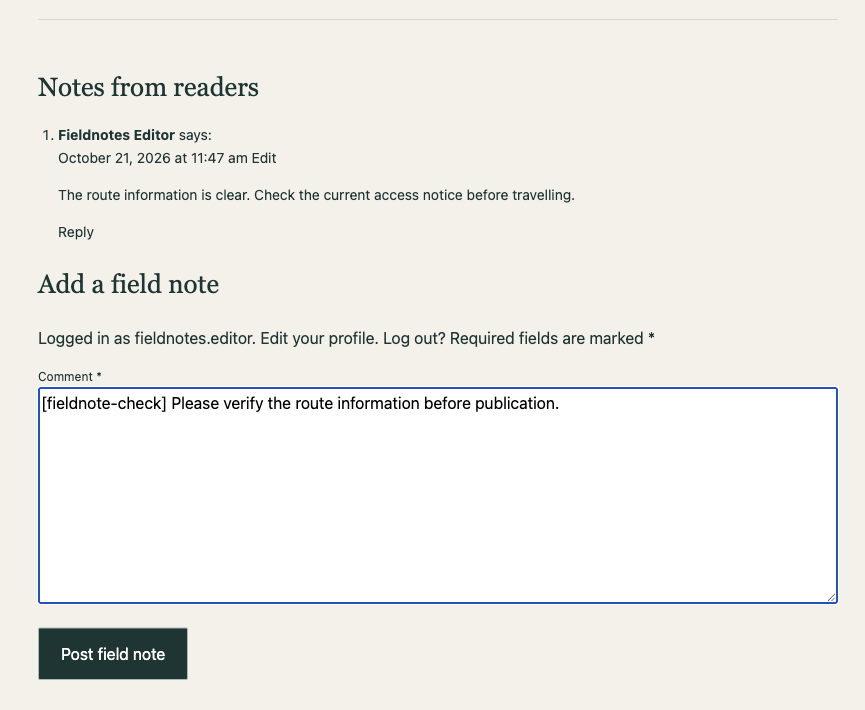
An ordinary comment produced one audit record and no extra record. A comment containing the marker increased the audit count to two and created the first extra record. The comment itself still appeared normally on the article page.
Reading the trigger before deleting it
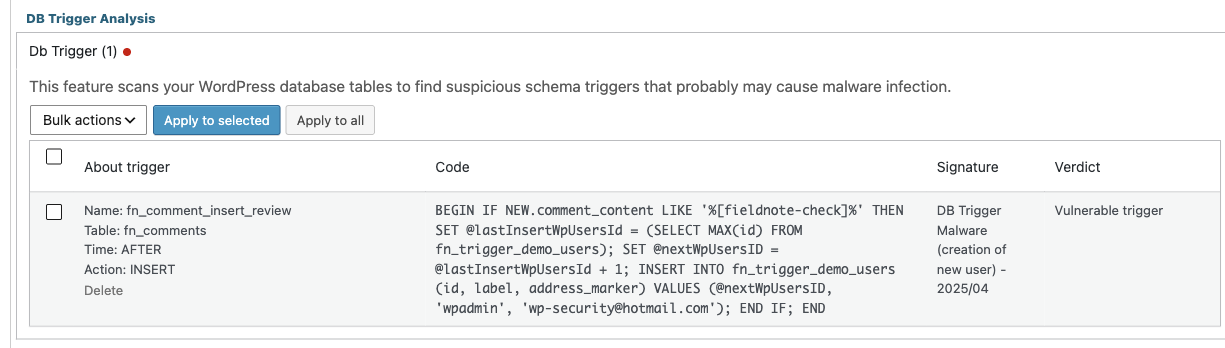
The scanner exposed the trigger body alongside its name, table, timing and event. The definition explains what activates the trigger and what its statement changes.
| Part of the definition | Meaning |
|---|---|
| AFTER INSERT on fn_comments | Runs after a new comment row is inserted, not when a plugin page is opened. |
| NEW.comment_content LIKE … | Checks the text of the newly inserted comment for the marker. |
| SELECT MAX(id) and the next-ID assignment | Chooses an identifier for the additional record. |
| INSERT INTO fn_trigger_demo_users | Writes the extra record to a different table. |
| Fixed label and address values | Provide recognisable values inside the signature-matching statement. |
In a compromised site, a comment-driven insertion into an account table deserves immediate review. A familiar-looking username alone does not establish its role. The destination table, columns and any capability changes determine the effect. The important question is why saving a reader comment should create that unrelated record at all.
Triggers also support legitimate work, including audit trails. Their existence is not proof of infection. MariaDB documents these event and timing rules. The ordinary audit trigger provided a useful comparison here because it responded to the same comment event without matching the malware signature.
Enable DB Trigger Analysis in CleanTalk
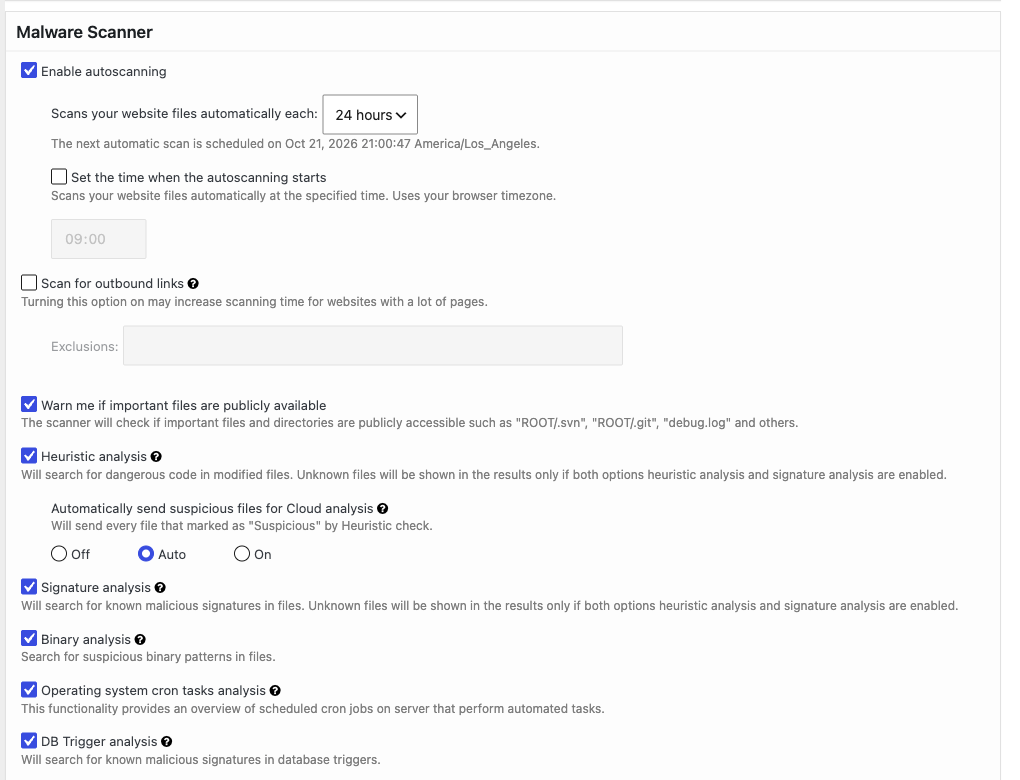
Install Security by CleanTalk from WordPress.org and connect an active CleanTalk service. Open Settings → Security by CleanTalk → General Settings → Malware Scanner. Make sure DB Trigger analysis is enabled, then save any changes.
Open Malware Scanner and select Perform Scan. When the scan finishes, expand DB Trigger Analysis → Db Trigger. The report listed fn_comment_insert_review on fn_comments, with AFTER, INSERT and the verdict Vulnerable trigger. The signature was DB Trigger Malware (creation of new user), dated April 2025.
The ordinary audit trigger was absent from the findings. DB Trigger Analysis compares trigger statements with known signatures. It does not label every trigger as malicious or guarantee detection of every possible database backdoor. The database account also needs sufficient privileges to expose the definitions and perform deletion.
What changed after Delete
Selecting Delete for the matching trigger and confirming the action produced Trigger has been deleted. The matching entry count fell from one to zero. The database still contained the ordinary audit trigger.

Another comment containing [fieldnote-check] was then submitted through the same form. The audit count increased to three, confirming that the normal comment event still ran. The extra-record count stayed at one. The removed trigger no longer caused another insertion.
| Comment event | Audit records | Extra records |
|---|---|---|
| Ordinary comment | 1 | 0 |
| Marker before Delete | 2 | 1 |
| Marker after Delete | 3 | 1 |
The existing extra record remained. Deleting a trigger does not undo earlier writes. Any accounts, options or content it changed need separate review.
Keep the cleanup wider than one finding
For a site with recurring malware, review the trigger’s previous effects and investigate how database access was obtained. Check accounts and capabilities, update the affected software, and examine other persistence locations. File System Watcher can reveal file changes while a database investigation is under way.
If administrator access may have been exposed, rotate the affected credentials and invalidate existing WordPress sessions with Shuffle Salts. Removing a trigger does not revoke an existing session. The SC malware investigation shows why recovery should cover more than the first suspicious file.
Questions about WordPress database triggers
Will replacing WordPress files remove a trigger?
Normally, no. A trigger belongs to the database. File replacement and database restoration are different operations. A database restore must also be checked for unwanted trigger definitions.
Does a zero finding count mean the entire database is clean?
No. It means there are no entries in that result list. Signature coverage, database visibility and other kinds of malicious database content still matter. In this case, the remaining audit trigger and the repeated comment confirmed the specific before-and-after result.
Does Delete undo earlier database changes?
No. The extra record in this sequence remained after deletion. Previous account, option or content changes need their own review.
Look beyond the files when the activity returns
If a suspicious account or record reappears, inspect the database objects that can recreate it. DB Trigger Analysis puts the trigger name, affected table, statement and matching signature in the WordPress dashboard, with a removal action for a reviewed finding. Install Security by CleanTalk and include WordPress database triggers in the investigation when a file cleanup does not explain what keeps coming back.